Troubleshoot DNS and SSL for a custom domain
Work through missing DNS records, ownership verification, and certificate delays.
Updated
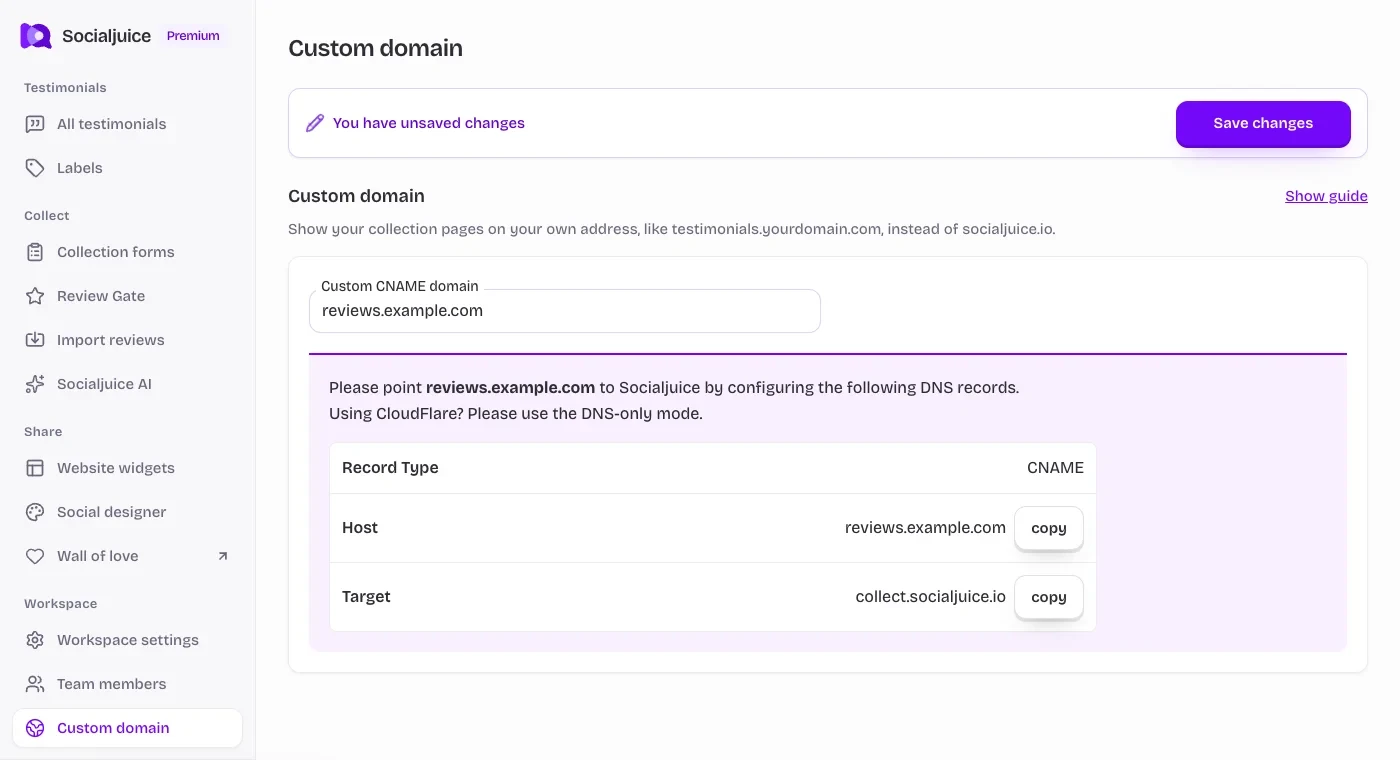
Current Socialjuice dashboard with example data. Interface labels follow your dashboard language.
On this page
Separate DNS from page content
First open your default Socialjuice public page. If it works there but not on the custom hostname, focus on DNS, verification, and SSL. If both open but a testimonial is absent, check visibility and widget filters instead.
Check the exact records
- Open Workspace settings → Custom domain and confirm the hostname saved for the correct space.
- At your authoritative DNS provider, check that this hostname has a CNAME targeting collect.socialjuice.io. A root-domain record does not configure a subdomain automatically.
- Check that the provider did not append your domain twice. Remove a conflict only after checking what the existing record serves.
- If you use Cloudflare, confirm DNS only for this record. Add the exact TXT records shown by Socialjuice if verification is requested.
- Return to Socialjuice and choose Refresh. Allow time for DNS caches and certificate provisioning before retrying.
Understand the status
Waiting for TXT verification record points to ownership verification. DNS not pointing to Socialjuice yet (no SSL) points to DNS routing or SSL readiness. Connected · SSL certificate active means you can test the HTTPS public address.
If the browser reports an invalid certificate, stop and check the hostname and dashboard status. Do not bypass the warning or send customers to an unsecured page.
Ask for help with useful details
Send the hostname, your DNS provider, the record types and target, the status text, and approximately when you changed the records. Screenshots should exclude account credentials and unrelated private records. These details help distinguish a provider issue from a Socialjuice configuration issue.